Realistic Genetics
A Sims 4 genetics mod that actually remembers the whole family.
Give your legacy more of its family history: inherited colors, hidden traits, and facial features from parents and grandparents.
Version 3.0.0 is here. Our first official public build adds a Sim pie menu and lets you choose individual features from the family tree.
See everything new since August ↓Free · Works with existing saves · Made for legacy players
Our first official public build
A proper in-game menu. Your grandmother’s nose. Your dad’s hair color. Much more say in what your Sims inherit.
A note from Fox
I’m sorry it’s been quiet since August. Between family issues, working full time as a director of technology, and being in school, I haven’t had as much time here as I wanted.
I’ve tried to work through everything raised in the Discord discussions. It’s just me making and testing this, so I don’t have the time to test every situation. It’s been quite stable and working well in my own game, and I wanted to share the improvements with you. The changes below are what made it into this release.
I’m not abandoning the project. Thank you for being patient, and please keep letting me know how it’s working in your saves.
Everything starts with a click
Click a Sim and look for Realistic Genetics, now with its own helix icon. View inheritance, reroll genetics, keep the current appearance, choose a family feature or open Settings from the same menu.


Choose a feature. Choose a relative.
Open Inherit from Family to choose a nose, eye shape, mouth, hair color or eye color from an available parent or grandparent. Open Face Shape for jaw, chin, cheeks, brow, head shape and ears.

Pick the relative, review the change, then confirm. You can take a nose from one grandparent and a mouth from another without rerolling the whole Sim. Facial transfers are available for supported human Sims who are teen or older; unavailable relatives or features explain why they cannot be used.

See the hair color before you choose
Hair inheritance now shows a CAS color chip alongside each relative’s natural color. Each outfit keeps its own hairstyle. If the exact color swatch is unavailable for a style, the mod won’t swap in a different haircut to make it work.

Screenshots from the game, cropped to the relevant menus. Select any image to open the full screenshot.
Fixes and improvements since August
More control over appearance
Automatic appearance updates check that a Sim belongs to your active household. Turn Automatic Genetics off for manual control, or use Keep This Appearance to record the current face. Hair recoloring uses the existing hairstyle’s matching swatch, and the fallback that could restore an older haircut has been removed.
Both parents count
Parent selection no longer mistakes the pregnant Sim for both parents. It reads both recorded biological parents, including same-sex couples, and keeps both available relatives in same-sex grandparent pairs.
Inherited colors stay in the family
Hair and eye inheritance now retains the two inherited alleles instead of losing a hidden color after a roll. A child receives one allele from each known parent and keeps that pair for their own children. Established natural colors are stored separately from later cosmetic changes.
Eye colors and labels corrected
The gray/brown mismatch was checked against the game’s eye resources and corrected. The catalog now recognizes 109 EA human eye resources, including age variants. Unknown eyes are no longer given an invented color label, and combined names are easier to read, such as Grey-Blue.
Individual twin rerolls
Rerolling one Sim no longer copies the new appearance onto their identical sibling. This applies to the pie menu, inheritance and birth cards, and console rerolls. Twins also keep separate editable report data. The identical-twin setting for birth generation is unchanged.
More precise facial features
Facial regions were checked against EA’s resource data, adding missing mappings and correcting 57 older labels. Individual feature inheritance now uses the same facial write path as the initial roll, fixing the reported Feature Not Changed error. Unrelated face and body data are preserved.
Better saved plans and reports
Pregnancy inheritance plans keep their color alleles, family snapshots and feature sources. Age-up restoration uses the stored facial plan. Reports track whether a change was applied, skipped or deferred, and a failed reroll no longer shows another Sim’s report.
Safer saving and cleaner menus
Genetics data is written atomically with backup recovery. Save failures are reported instead of presented as successful. The menus now include clear family roles, working portraits, the helix icon and hair-color chips. Canceling a new feature picker leaves the Sim alone.
Already using an older version? Replace both mod files and keep your existing settings and genetics data. Updating does not automatically recolor old Sims to match a corrected label.
What this does, in one line
It gives your Sims an actual genetic history.
How it works
When a baby is born, the mod looks at the actual family tree instead of only using the two parents.
Hair and eye color are passed down using dominant and recessive genetics. A Sim can carry a color without showing it, then pass it on to a later generation.
Skin tone works a little differently. It blends the parents’ tones, with some influence from further up the family, so children land in a natural range for their family rather than a random shade.
Facial features can also come from different relatives. A child might get their mom’s eyes, their dad’s mouth and their grandmother’s nose.
Hair and eye colors keep their inherited allele pairs for later generations. Changing a cosmetic appearance does not automatically replace that stored natural inheritance. This is a simplified model built for gameplay.
A trait can disappear for a generation and come back later because the Sim was still carrying it.
What gets passed down?
- Eye color
- Hair color
- Skin tone
- Eyes
- Nose
- Mouth
- Jaw and face shape
- Other facial features
Every feature is rolled separately, so siblings won’t all look the same.
One child might look mostly like their dad. Another might look more like their mom. Another might randomly look exactly like a grandparent.
The point isn’t to make every Sim look identical. It’s to make them look like they came from the same family.
See the difference
This is one baby, generated twice. On the left is the game’s version. On the right is the mod’s version, built from the family underneath. Look at the family, then look again.
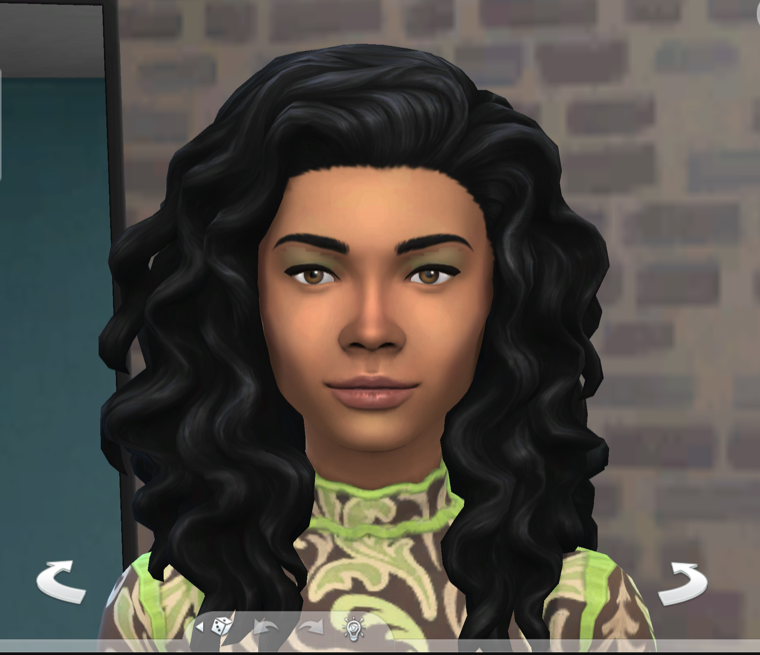
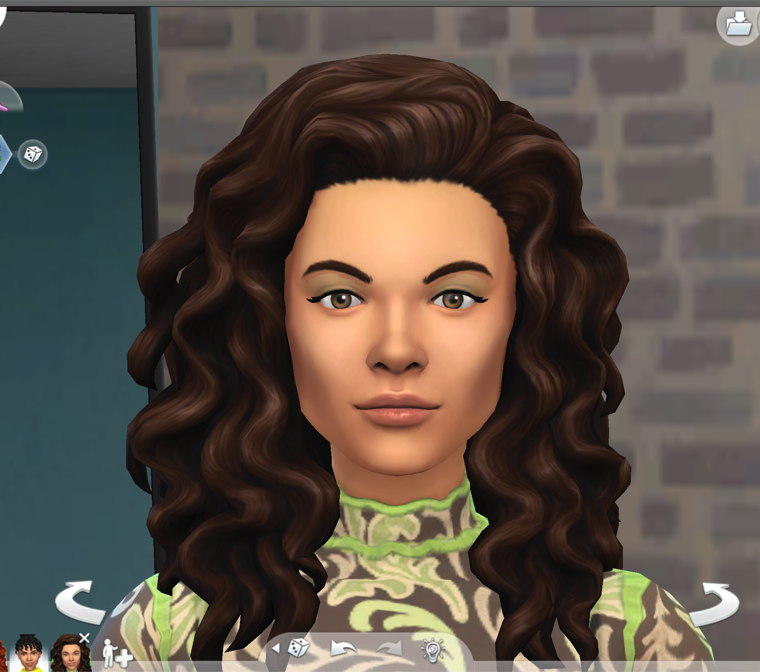
- The baby
 Mom
Mom Grandma
 Grandpa
 Dad
Dad Grandma
 Grandpa
The parents and grandparents the mod pulled from.
See it across a family
This is where the mod gets interesting.
You might notice a grandchild has the same nose as their grandmother. Two cousins might have the same eyes. A hair or eye color can disappear and then show up again a generation later.
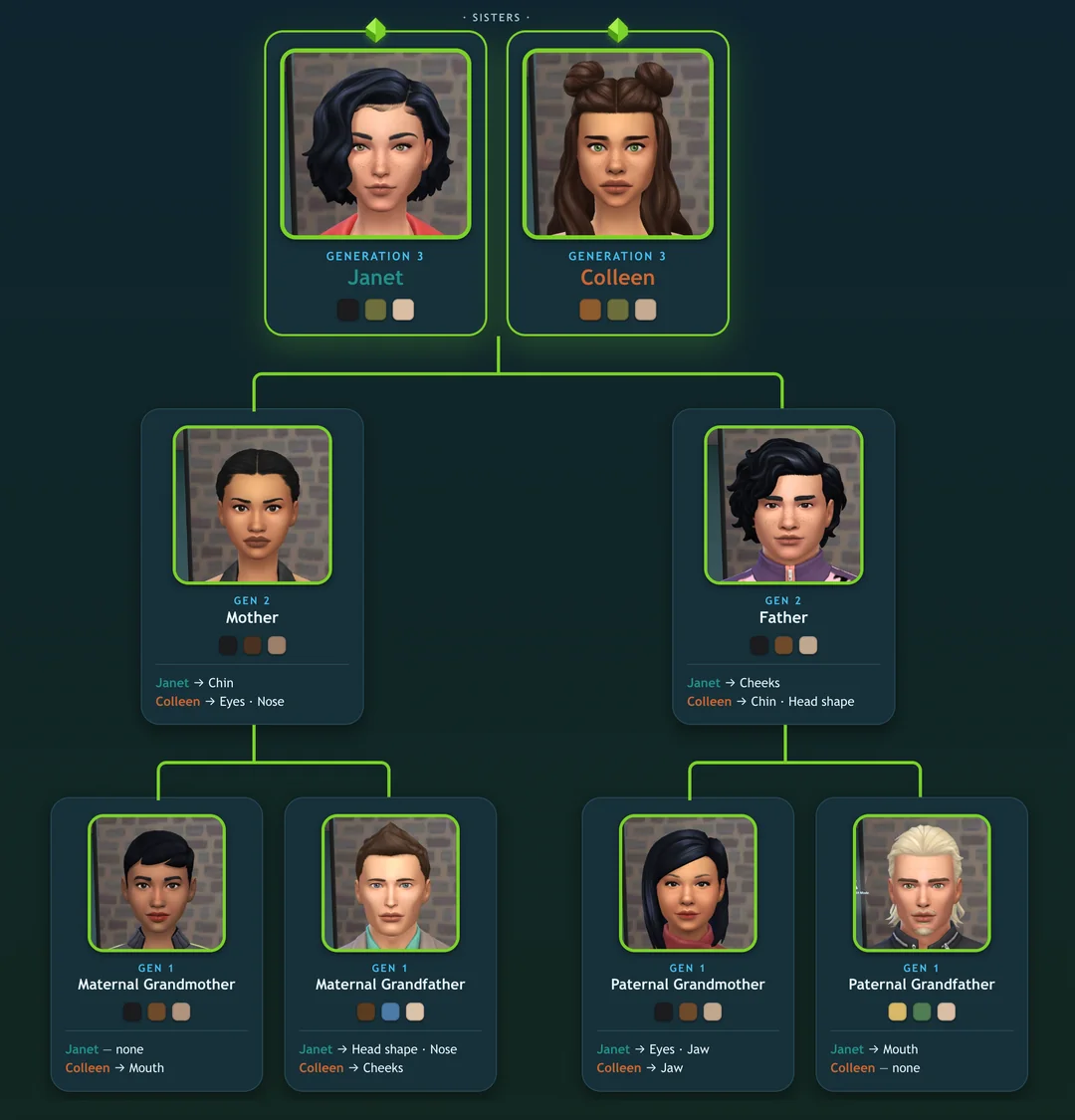
The longer you play the family, the more you can actually see traits moving through it.
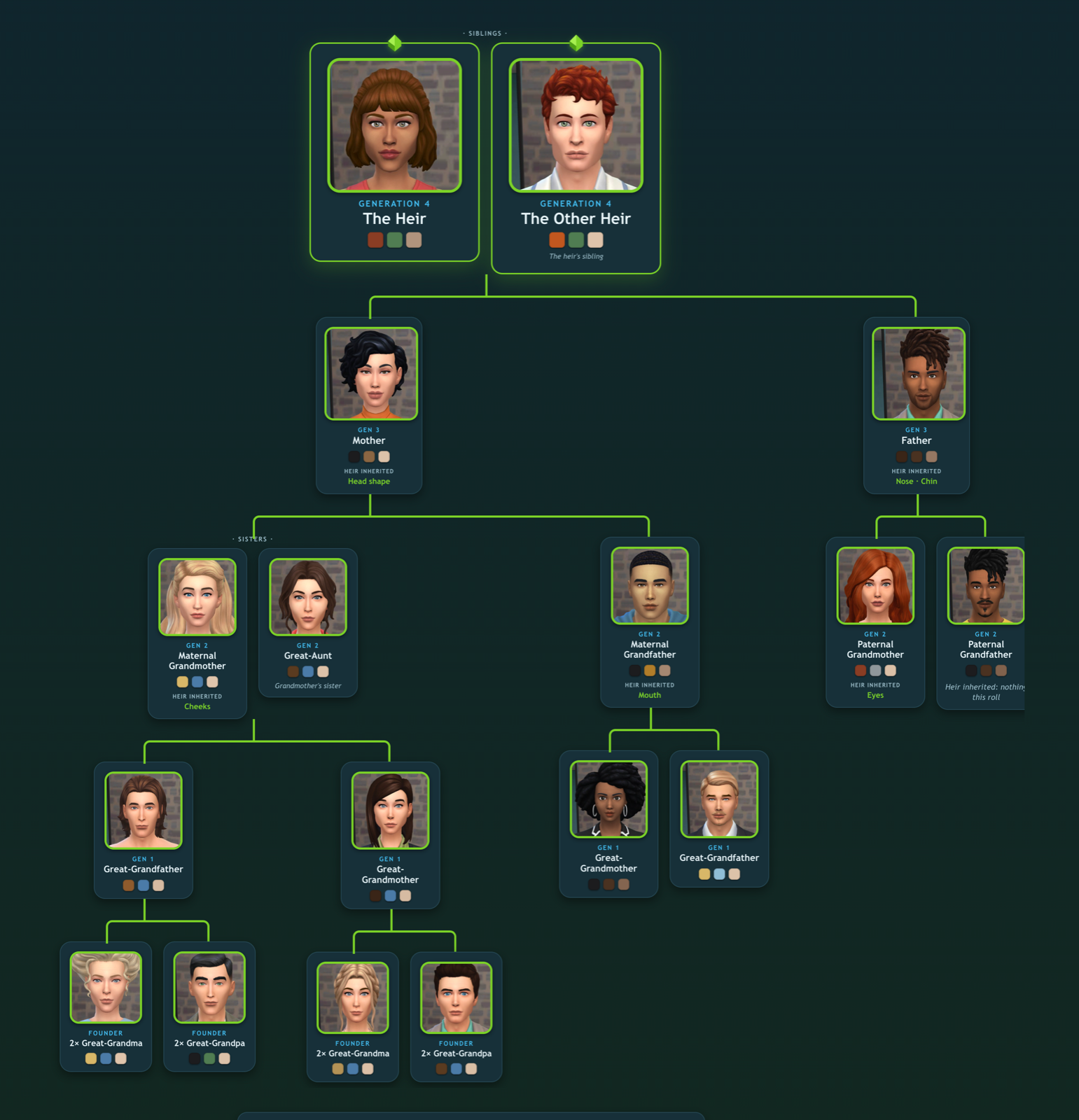
You can look at a Sim and tell where they came from.
Realistic Genetics 3.0.0
Released October 12, 2026. Free, with the script, menu package, installation instructions and feature guides included.
Download Realistic Genetics 3.0.0Installing it
- Close the game, back up your save, then download and unzip the file.
- Put both
RealisticGenetics.ts4scriptandRealisticGenetics.packagein Documents › Electronic Arts › The Sims 4 › Mods. Replace your old copies and remove any duplicate versions. Keep your settings and genetics data. Don’t place the files more than one folder deep. - Make sure Custom Content and Mods and Script Mods Allowed are turned on in your game settings.
- Restart the game.
Using it
By default, genetics runs automatically for new babies in your active household. Click a Sim and open Realistic Genetics to view inheritance, reroll, keep their current appearance, or choose a family feature. Turn Automatic Genetics off in Settings for manual control.
You can also use the tool with an existing multigenerational legacy. It scans up the family tree, captures the parents and grandparents it can find, and builds the genetics from there.
You do not need to start a new save.
Is it safe for my save?
It shouldn’t delete Sims, change relationships or rebuild your whole family.
Back up your save before installing an update, especially a legacy you’ve been playing for years. Keep your existing genetics data when replacing the mod files.
The system is doing a lot behind the scenes, and there may be weird family setups or mod conflicts I haven’t seen yet.
Compatibility & custom content
Development checks used game version 1.128.90.1230 and the relevant pregnancy calls in MC Command Center 2026.5.0. I can’t promise every combination of mods and settings has been tested. If something behaves differently in your save, please send your game version, other mods, and what you were doing when it happened.
The updated catalogs use EA’s game resources for eye designs, hair swatches and facial regions. Custom eyes, hairstyles or sliders need a recognized match for the relevant inheritance tool. Unsupported choices explain why they cannot be used.
Questions
Do I need to start a new save?
Does it change every Sim in my save?
Can I choose just one feature?
Will choosing a hair color change the hairstyle?
Can recessive colors skip generations?
Does it support same-sex parents?
Will rerolling one twin change the other?
Does it work with MC Command Center and custom content?
What should I keep when updating?
Any bugs to report?
Let me know here!